Internationalization (i18n) Support
This article is about:
- Translation system architecture and design
- TOML-based translation file format
- Runtime language switching mechanism
You will learn about:
- How translation loading and caching works
- Translation file structure and validation
- Integration with settings and command systems
Overview
The i18n system provides runtime language switching with automatic fallback to English for missing translations. Translation files use TOML format with nested key structures accessed via dot notation.
Architecture Components
TranslationLoader
The TranslationLoader class manages all translation operations:
- File Loading: Parses TOML translation files from the languages directory
- Caching: In-memory cache with thread-safe access for performance
- Fallback: Automatic fallback to English for missing keys
- Runtime Switching: Dynamic language changes without restart
Translation File Format
Translation files follow a structured TOML format with specific sections:
Meta Section
Contains language metadata:
[meta]
language_code = "en"
language_name = "English"
version = "1.0.0"
Settings Section
Hierarchical structure for settings translations:
[settings.categories]
llm = "LLM Configuration"

[settings.llm]
category_name = "LLM Configuration"
category_description = "Settings for language model configuration"

[settings.llm.api_url]
name = "API URL"
description = "URL for the Ollama API endpoint"
hint = "Example: http://localhost:11434/api"
Commands Section
Command names and descriptions:
[commands.base]
help_name = "help"
help_description = "Display help for available commands"
Global Access Pattern
The system uses a global singleton pattern with convenience functions:
get_translation_loader(): Access global instancetranslate(key, **kwargs): Translate with format argumentsset_language(code): Change current language
Design Patterns
Singleton Pattern
Global translation loader ensures consistent state across the application.
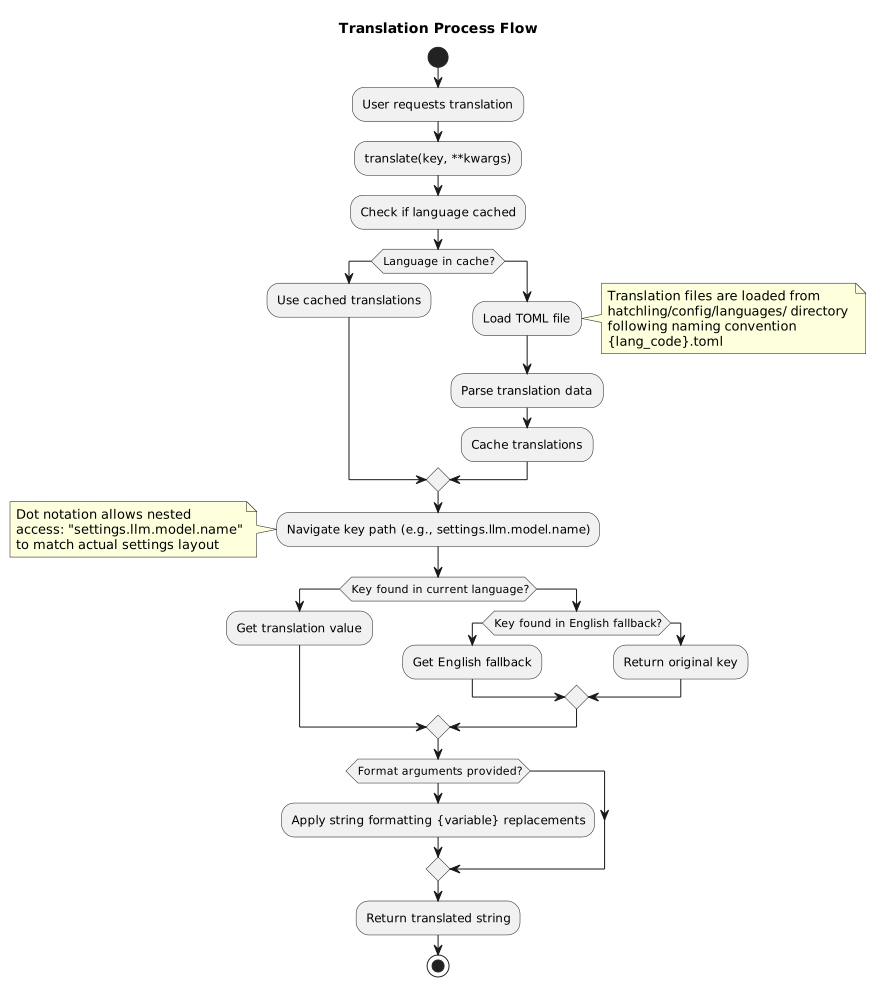
Translation Process Flow
Translation lookup follows a consistent pattern: current language → fallback to English → return key if not found.
Integration Points
Settings System
Translation keys are used throughout the settings system for:
- Category display names
- Setting names and descriptions
- Help text and hints
Command System
Commands use translated strings for:
- Command names (in localized versions)
- Help descriptions
- Error and success messages
Chat Interface
The chat system displays translated text for:
- Command feedback
- Error messages
- Status information
Current Language Support
- English (en): Default/template language with complete coverage
- French (fr): Full translation available
Translation files are located in hatchling/config/languages/ with naming convention {language_code}.toml.
Key Files
hatchling/config/i18n.py: Translation loader implementationhatchling/config/languages/: Translation files directoryhatchling/config/languages/en.toml: English templatehatchling/config/languages/fr.toml: French translation